
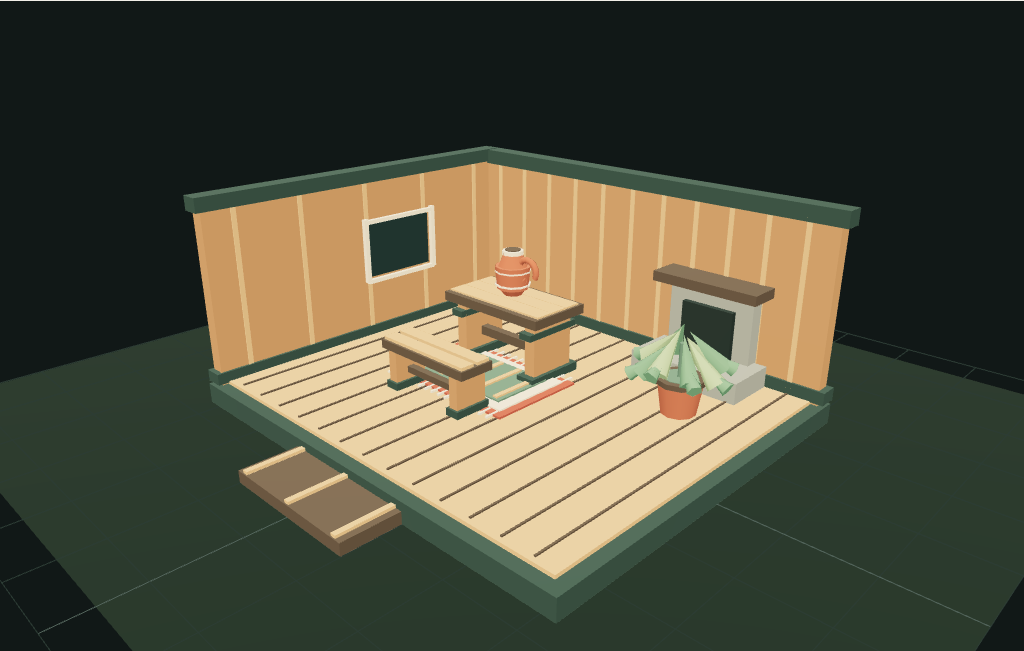
Lift the roof.
Open Scene Lab’s Alder Cabin setting and choose Open 3D cabin. The poster stays in place while the actual models load. Try Cutaway for a room view and Plan to look straight down. Use Exterior to see the roof, entrance and outdoor furniture.
The original starter has a table, bench, rug, fern and clay jug. Choose Bed & porch for a bed inside and a rocker on the fitted patio. Changing starters replaces the arrangement, so save a recipe first if you want to keep your current layout.
Place, then turn.
Select a piece in the furniture list. In Cutaway or Plan, choose Place on floor, then tap or click a clear spot. The placement gesture ends after a valid position, and you can orbit the view again. Use the fine adjustment controls for a precise position, scale and rotation.
Use Turn piece −90° or Turn piece +90° to rotate the selected object. The camera’s rotate and zoom buttons move the view instead. If a position collides or falls outside the supported surface, the layout stays at its last accepted position and the notice explains the problem.
Use the visible rotate and zoom buttons to frame the room. Choose Plan for easier placement, select an object, then explicitly start Place on floor. An ordinary drag orbits the camera; it does not move furniture.
A rocker outside.
Attach the patio or start from Bed & porch. Select the Alder Porch Rocker and choose Patio deck. It moves to a clear supported position. You can then place it elsewhere on the deck, keeping the stairs clear. Return to Cabin floor to bring it indoors.
The patio was fitted to this cabin’s doorway and foundation. It is a separate downloadable GLB, with its own specifications and simpler LOD. This browser arrangement check does not simulate structural support or character movement.
A quiet evening.
Expand Lighting and choose Moonlight for a darker room. Switch the lantern and hearth on for local illumination. Atmosphere offers rain, snow, storm and wind; sound and music are optional. Clear weather and silence are the defaults. Reduced-motion preferences pause automatic effects until you choose to animate them.
These effects run in Scene Lab. A downloaded GLB does not contain the browser’s weather, synthesized audio, fire effect or lighting controls. Exterior finish choices change the shell’s timber surfaces; the interior keeps its original material palette.
Send someone a place.
Use Copy cabin link to share the validated layout, including its supported finish and furniture choices. You can also download a JSON recipe and restore it in Scene Lab later. The recipe contains positions and choices, rather than model bytes; download the assets separately.
Atmosphere, sound and lighting preferences stay separate from recipes. Check the shared link in a fresh tab to see what your recipient will open. The Alder Cabin collection gathers all nine model pages and individual file downloads in one place.
Try the cabin